Category: Podcast Tech

  • Choosing Free Recording Software for Your Two-Person Podcast

    Choosing Free Recording Software for Your Two-Person Podcast

    Starting a two-person podcast is an exciting way to share your ideas and connect with listeners, but recording quality can make or break your show. For new podcasters on a budget, free recording software is a game-changer. Below, we dive deep into the best free tools for 2025, tailored for two-person podcasts, whether you’re recording in person or remotely. These tips will help you pick the right software to ensure clear audio, easy editing, and a professional sound without spending a dime.
    Why Free Recording Software Matters

    Free software lets you focus on content and chemistry without financial stress. For two-person podcasts, you need tools that handle dual audio tracks (one for each host) to simplify editing and ensure crisp sound. The right software should also support your setup, local or remote, and be beginner-friendly. Here’s a breakdown of the best free options and how to use them effectively.

    Top Free Recording Software for Two-Person Podcasts

    1. Audacity (PC/Mac/Linux)

    • Why It’s Great: Audacity is a free, open-source powerhouse for recording and editing. It supports multi-track recording, so each host’s audio is captured separately, making it easy to edit out coughs, interruptions, or background noise without affecting the other track.
    • Best For: In-person recording with two USB microphones plugged into one computer. It’s also great for solo editing if one host handles post-production.
    • Key Features:
    • How to Use It:
    • Tip: Check X for Audacity tutorials or community tips (search #AudacityTips). Download from audacityteam.org to avoid sketchy third-party sites.

    2. Riverside.fm (Free Tier)

    • Why It’s Great: Riverside is a top pick for remote two-person podcasts. It records high-quality audio (and video) locally on each host’s device, ensuring crystal-clear sound even with spotty internet. The free tier is limited but perfect for new podcasters testing the waters.
    • Best For: Remote setups where hosts are in different locations.
    • Key Features:
    • How to Use It:
    • Tip: Test your internet and mic setup before recording. Riverside’s local recording saves you from Wi-Fi woes, but a stable connection helps with real-time chat.

    3. Anchor by Spotify

    • Why It’s Great: Anchor is a free, all-in-one platform for recording, editing, and publishing. It’s beginner-friendly and supports remote or in-person recording, making it ideal for hosts who want simplicity and instant distribution to Spotify, Apple Podcasts, and more.
    • Best For: Podcasters who want to record, edit, and publish from one platform, especially on mobile.
    • Key Features:
    • How to Use It:
    • Tip: Anchor’s mobile app is great for recording on the go, but for better quality, use external mics and export to Audacity for advanced editing.

    4. GarageBand (Mac/iOS)

    • Why It’s Great: Free for Apple users, GarageBand offers a sleek interface for recording and editing multi-track audio. It’s intuitive and includes built-in effects and music loops to enhance your podcast.
    • Best For: In-person recording with Mac users or solo editing on a Mac/iPhone.
    • Key Features:
    • How to Use It:
    • Tip: Explore GarageBand’s free loops for a custom intro. Watch YouTube tutorials for quick editing tricks specific to podcasting.

    Choosing the Right Software for Your Setup

    • In-Person Recording: Audacity or GarageBand is your best bet. Both handle multiple mics and give you full control over editing. Audacity is cross-platform, while GarageBand is Mac-only but more intuitive.
    • Remote RecordingRiverside.fm or Anchor shines here. Riverside offers higher-quality audio with separate tracks, while Anchor is simpler for quick recording and publishing.
    • Editing Needs: If you want advanced editing, use Audacity or GarageBand. For quick edits and publishing, Anchor or Riverside’s built-in tools are enough.
    • Tip: Test all four tools with a short 1-minute recording to compare ease of use and audio quality. Check X for real-time user reviews (search #PodcastSoftware) to see what other new podcasters recommend.

    Pro Tips for Recording Success

    • Test Audio Levels: Always record a short test to ensure both hosts’ audio peaks between -12 and -6 dB. Too loud (0 dB) causes distortion; too quiet loses clarity.
    • Use Headphones: Both hosts should wear headphones to prevent echo, especially for remote recording on Riverside or Anchor.
    • Backup Recordings: Save raw files before editing. Riverside auto-uploads to the cloud, but for Audacity or GarageBand, store files on an external drive or free cloud service like Google Drive.
    • Learn Basic Editing: Spend an hour on YouTube learning Audacity or GarageBand basics. Focus on cutting pauses, normalizing volume, and reducing noise for a pro sound.
    • Check Compatibility: Ensure your mics work with your chosen software. USB mics are plug-and-play with all these tools, but test first.

    Why These Tools Work for Beginners

    These free tools are battle-tested by podcasters in 2025. Audacity’s open-source community ensures constant updates and tutorials. Riverside’s free tier is designed for remote creators, with X users praising its reliability (#RiversideFM). Anchor’s seamless publishing saves time, and GarageBand’s Apple integration makes it a no-brainer for Mac users. By starting with these, you avoid costly subscriptions while learning the ropes.

    Next Steps

    1. Pick one software based on your setup (Audacity/GarageBand for in-person, Riverside/Anchor for remote).
    2. Download and test it with your co-host this week.
    3. Record a 5-minute practice episode to get comfortable.
    4. Search X for #PodcastTips to join the community and share your progress!

    With these free tools, you and your co-host can start creating a podcast that sounds great and builds your audience without spending a penny. Happy recording!

    Written by Yuresh Shayzer | Podcast Editor
  • Top 10 AI Tools Every Podcaster Should Know in 2026

    Top 10 AI Tools Every Podcaster Should Know in 2026

    Podcasting has never been easier or more competitive. With AI, you can edit faster, repurpose smarter, and grow your audience without burning out.

    After editing 400+ episodes, here are my top 10 AI tools that can transform your podcast workflow


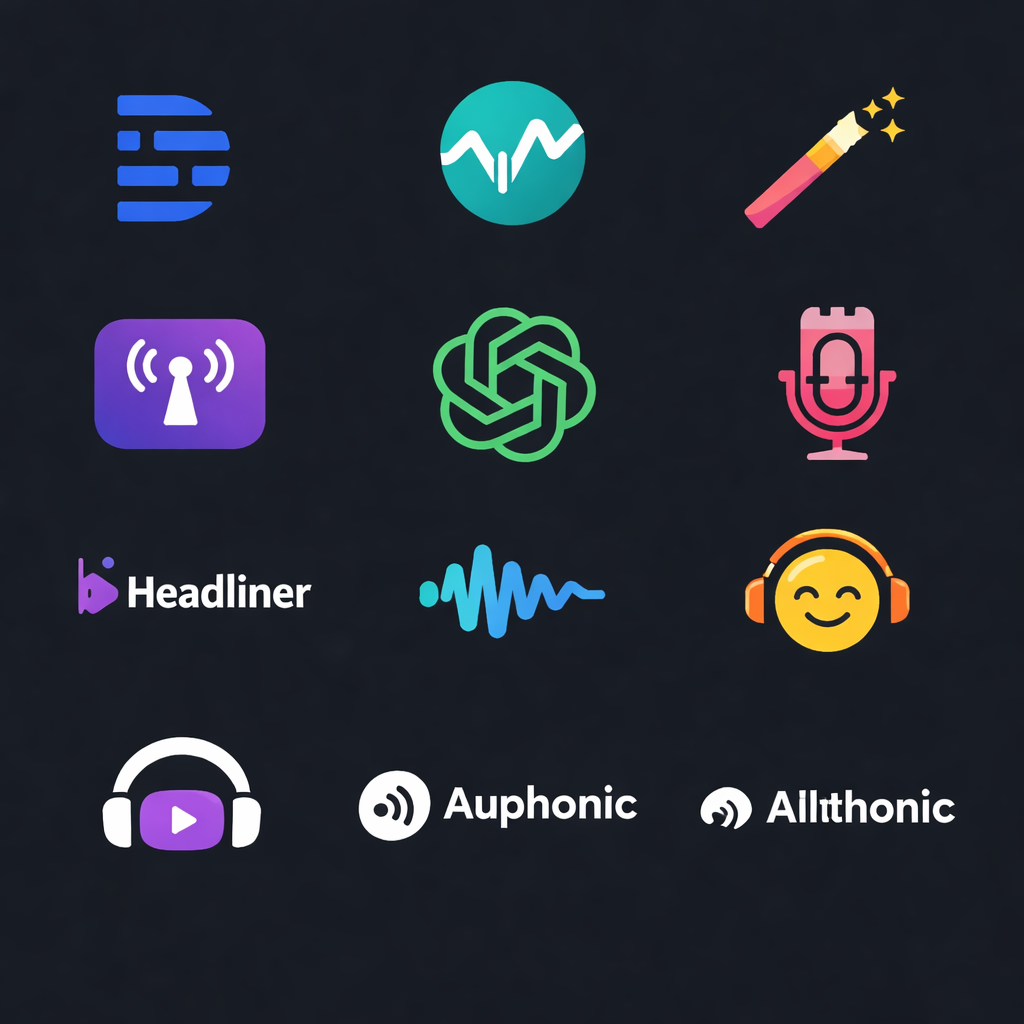
    1. Descript – Edit Audio Like a Document

    Transcribes your audio instantly, allowing you to edit text instead of waveforms.

    • Auto transcription
    • Filler word removal
    • AI overdub (fix mistakes in your own voice) Best for: Editing faster without being a pro

    2. Cleanvoice – AI Audio Cleanup

    Removes background noise, filler words, and mouth sounds.

    • Multilingual support
    • Automatic noise reduction
    • Smart silence trimming Best for: Podcasters without a treated studio

    3. Castmagic – Repurpose Your Podcast

    Turns raw audio into show notes, newsletters, and social posts.

    • Episode summaries
    • Quotes & timestamps
    • Keywords & Q&A Best for: Content creators who want to market smarter

    4. Riverside – AI-Powered Recording

    Studio-quality remote recording + AI extras.

    • Local recordings in HD
    • AI show notes
    • Magic Clips for social media. Best for: Remote interviews with pro-quality

    5. ChatGPT – Your AI Podcast Assistant

    Helps with brainstorming, scripting, and promotion.

    • Write intros, scripts, & questions
    • SEO-friendly show notes
    • Guest research & outreach Best for: Creative & admin support at every stage

    6. Podcastle – All-in-One AI Studio

    Record, edit, and enhance your podcast in one place.

    • AI noise removal
    • Multitrack editing
    • Remote interviews Best for: Beginners who want simplicity

    7. Headliner – Audiograms Made Easy

    Create social-ready podcast clips with AI captions.

    • Auto-generated audiograms
    • Captions & transcripts
    • Multiple platform templates Best for: Social media promotion

    8. Sonix – Transcription & Translation

    Fast, accurate transcription in 40+ languages.

    • Multi-language support
    • AI subtitles
    • Built-in translation Best for: Global podcasters

    9. Alitu – Podcast Editing Made Simple

    Automates editing, leveling, and publishing.

    • AI cleanup of audio
    • Drag & drop editing
    • Direct hosting & publishing Best for: Busy podcasters who want automation

    10. Auphonic – Pro-Level Sound Engineering

    AI-driven audio mastering.

    • Automatic leveling
    • Background noise reduction
    • Loudness normalization (meets podcast standards) Best for: Polished sound without hiring an engineer

    Final Thoughts

    AI won’t replace your creativity, but it can supercharge it.

    • Want faster editing? → Descript, Alitu
    • Need cleaner audio? → Cleanvoice, Auphonic
    • Struggle with marketing? → Castmagic, Headliner
    • Want to scale globally? → Sonix

    With the right AI tools, you can focus more on your voice and less on the busywork.

    Which of these tools have you tried, or want to test in 2025? Drop your pick in the comments!

    Written by Yuresh | Podcast Editor

  • How to Handle Tech Issues, Sudden Deletions, and Emergencies in Podcasting

    How to Handle Tech Issues, Sudden Deletions, and Emergencies in Podcasting

    If there’s one lesson editing 400+ podcast episodes has taught me, it’s this: Tech issues don’t knock before they arrive.

    Hard drives fail. Files corrupt. Software freezes. Power cuts happen at the worst possible time. And when you’ve got a deadline or an excited client waiting for their episode, even a single deleted file can feel like disaster.

    The only way to survive, and thriveis to plan for these moments before they happen.

    My Personal Backup Rules as a Podcast Editor

    Over the years, I’ve built systems that keep me calm when chaos hits. Here are the strategies I use:

    1. The 3-2-1 Rule

    This is my golden rule for backups:

    • 3 copies of every file
    • 2 different storage types (external drive + cloud)
    • 1 offsite copy (Dropbox/Google Drive)

    This way, no matter what happens,laptop crash, office power outage, or even natural disasters,you always have a path to recovery.

    Article content

    2. Pre-Edit Backups

    Whenever I receive raw podcast recordings, I don’t touch the original. I convert WAV to FLAC first. Why?

    • FLAC is lossless (quality stays intact)
    • File size shrinks dramatically (sometimes 75% smaller)
    • Easier to move and store

    For example:

    • WAV (109 mins stereo) → 551 MB
    • FLAC (converted to mono 44.1kHz) → 133 MB

    That’s 4x smaller without losing audio quality.

    3. Integrity Checks

    Backups are useless if the files are corrupted. That’s why I run integrity checks whenever moving files between drives or cloud systems. This ensures what I restore later is exactly what I saved.

    Article content

    4. Multi-Layered Archiving

    Here’s how I store completed podcast episodes:

    • Local copy on my machine
    • Weekly sync to an external hard drive
    • Cloud backup (Dropbox/Google Drive)
    • Old archives on a “cold storage” external drive that’s kept offline

    It might sound like overkill, but when a client once asked for a 2-year-old episode, I was able to pull it up within minutes.

    Real-Life Lesson

    One time, after finishing a full 40-minute podcast edit, my DAW froze and the project file wouldn’t open again. For a few minutes, I thought I’d lost hours of work.

    But thanks to my autosave + backup system, I only lost about 3 minutes of progress. That moment taught me: backups aren’t optional, they’re insurance.

    Article content

    Final Thought

    If you’re podcasting, whether as a hobby or a business, your audio files are your assets. Protect them like gold.

    • Build backups before you need them
    • Automate wherever possible
    • Test your restores,don’t just assume backups are safe

    Because one day, a sudden crash or accidental deletion will happen. The only question is: will you be ready, or will you panic?


    Question for you: What’s your current backup workflow, are you relying on just one drive/cloud, or do you have a multi-layered safety net?

    Written by Yuresh | Podcast Producer & Editor | Helping creators protect their content & sound their best

    #Podcasting #Backups #TechTips #Productivity #ContentCreation

  • Best Podcast Recording Software (And Which One Is Right for You)

    Best Podcast Recording Software (And Which One Is Right for You)

    One of the first questions new podcasters ask is:
    “What’s the best software to record my podcast?”

    The honest answer is: there is no single best tool.
    There is only the right tool for where you are in your podcasting journey.

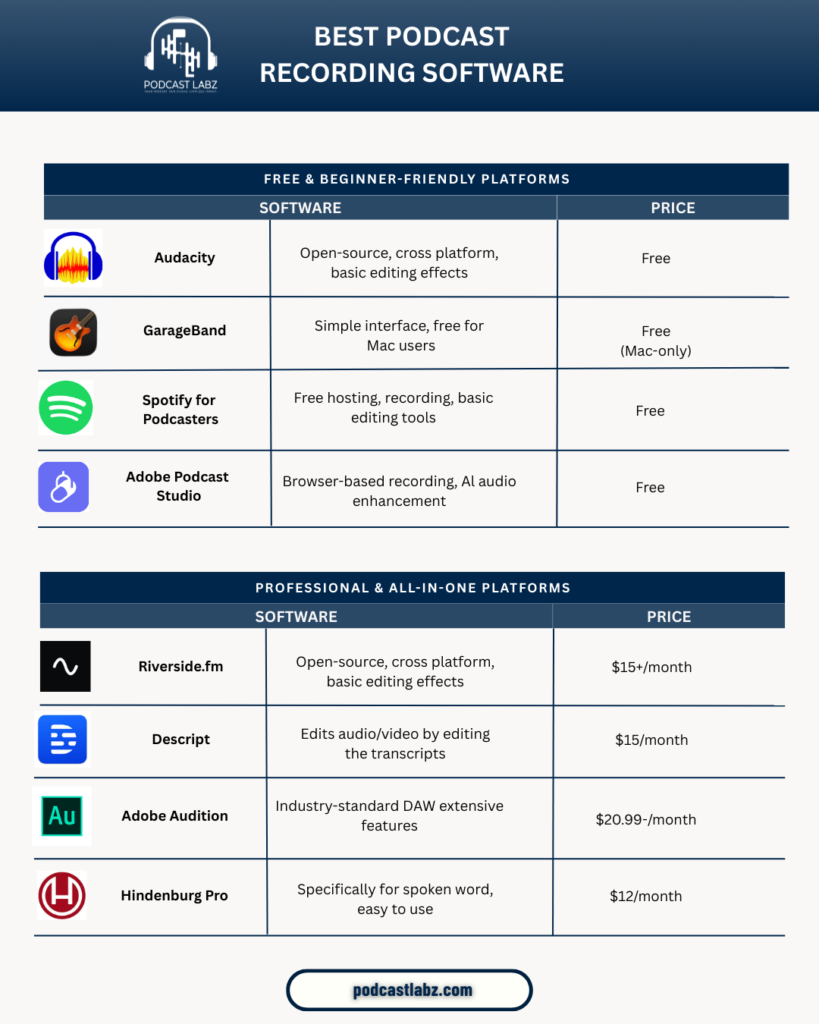
    Below is a clear comparison of some of the most popular podcast recording platforms, broken down into beginner-friendly tools and professional all-in-one platforms.


    Free & Beginner-Friendly Podcast Recording Software

    These tools are ideal if you’re just getting started, testing an idea, or working with a tight budget.

    Audacity

    Audacity is a powerful open-source audio editor that works on Windows and Mac.
    It’s great for basic recording and editing, but the interface can feel overwhelming for beginners. There’s no built-in remote recording or video support, so it works best for solo podcasts.

    Best for: DIY podcasters who don’t mind learning the basics of audio editing.


    GarageBand

    GarageBand is a clean, simple option for Mac users.
    It’s intuitive, beginner-friendly, and great for recording clean audio quickly. However, it’s limited to Apple devices and lacks advanced podcast-specific features.

    Best for: Solo podcasters using Mac who want a simple setup.


    Spotify for Podcasters

    Spotify for Podcasters offers free recording, hosting, and basic editing tools in one place.
    It’s extremely accessible, but customization and audio control are limited compared to professional tools.

    Best for: First-time podcasters who want everything in one free platform.


    Adobe Podcast Studio

    This browser-based tool shines because of its AI audio enhancement.
    It’s excellent for improving voice quality quickly, though it’s not a full editing solution.

    Best for: Podcasters who want fast, clean audio without complex editing.


    Professional & All-in-One Podcast Platforms

    If you’re publishing consistently, interviewing guests, or recording video podcasts, these tools offer much more control and quality.

    Riverside.fm

    Riverside records high-quality local audio and video, even with remote guests.
    It’s one of the best tools for professional-grade recordings, especially for video podcasts.

    Best for: Interview-based podcasts and creators focused on video quality.


    Descript

    Descript lets you edit audio and video by editing text.
    It’s a powerful tool for content repurposing, social clips, and fast edits, though it still requires some learning.

    Best for: Podcasters who want speed and transcript-based editing.


    Adobe Audition

    Adobe Audition is an industry-standard digital audio workstation used by professionals.
    It offers deep control over sound quality, noise reduction, and advanced editing but comes with a learning curve.

    Best for: High-quality, polished podcasts that need professional post-production.


    Hindenburg Pro

    Hindenburg is designed specifically for spoken-word content.
    It simplifies audio leveling, loudness, and clarity, making it a favorite among journalists and podcast producers.

    Best for: Podcasters who care about storytelling and clean dialogue.


    So… Which One Should You Choose?

    • Just starting out? Free tools are enough.
    • Recording interviews or video? Go professional.
    • Want your podcast to sound consistent and credible? Editing matters more than the tool.

    Great podcasts aren’t defined by software alone.
    They’re defined by clarity, pacing, and storytelling.

    That’s where a professional podcast editor makes the difference.


    Final Thought

    Your recording software helps you capture the conversation.
    A podcast editor helps shape the experience.

    If you’re recording episodes but struggling with editing, consistency, or polish, that’s a sign it might be time to hand post-production off to a professional.

    If you’re building a podcast and care about quality, feel free to connect.
    Happy to share insights or help you find the best setup for your show.